
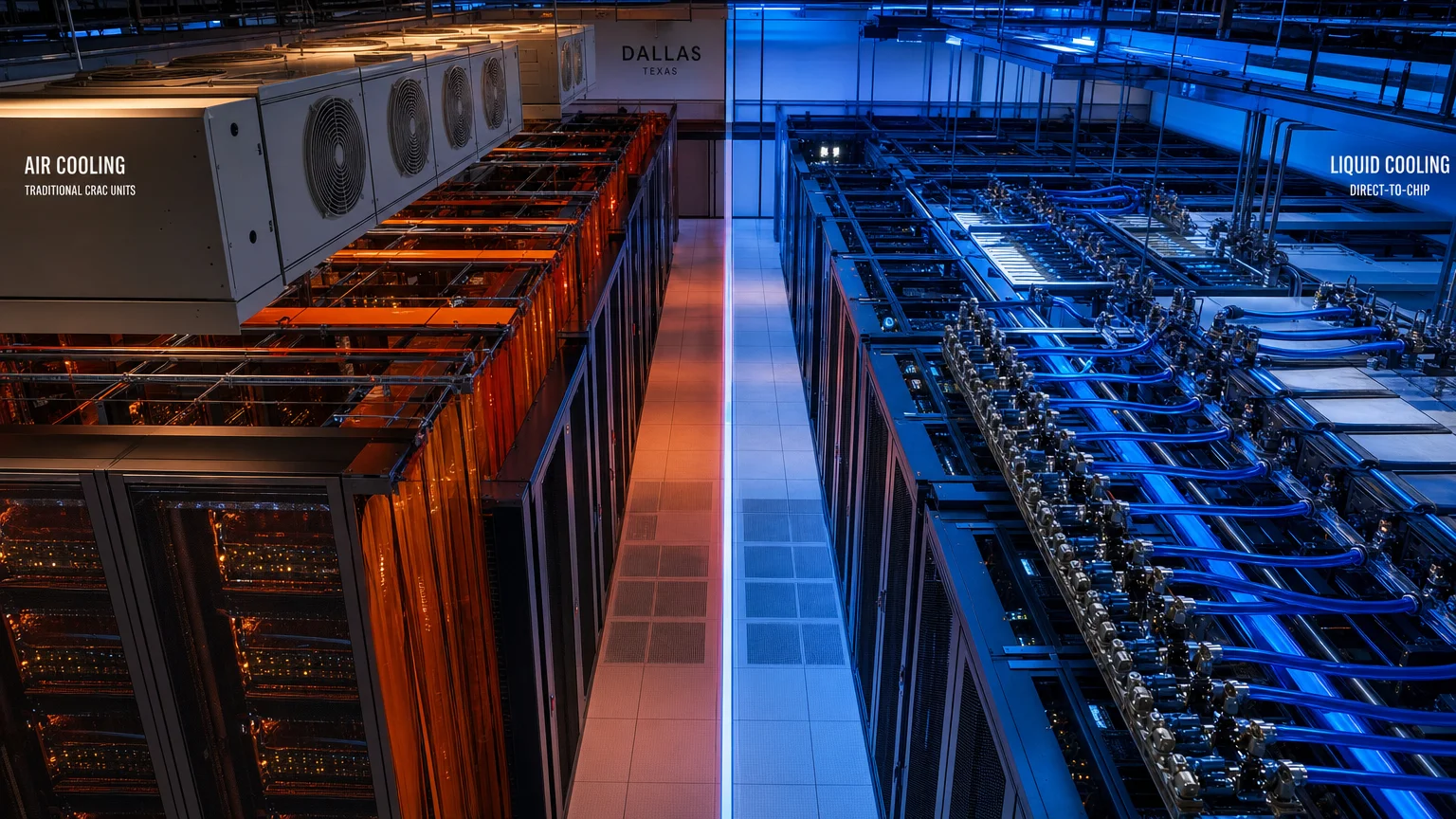
Modern AI servers—particularly those running NVIDIA H100 and H200 GPUs—generate thermal loads that traditional air cooling systems were never designed to handle. A single high-density AI rack can exceed 80 kilowatts of power draw, compared to the 10–20 kW that conventional air-cooled racks typically support. When you’re planning AI infrastructure, the choice between liquid cooling and air cooling isn’t just a technical preference—it’s a decision that shapes your facility requirements, capital costs, colocation options, and long-term scalability. This guide breaks down the liquid cooling vs air cooling debate for AI servers so you can make an informed decision before committing to a deployment strategy.
Key Takeaways
- Air cooling works well for racks under 20–30 kW, but most modern AI GPU clusters exceed that threshold significantly.
- Liquid cooling—including direct-to-chip and immersion methods—supports rack densities of 80–120+ kW.
- Liquid-cooled facilities typically achieve a Power Usage Effectiveness (PUE) of 1.1–1.2, versus 1.4–1.6 for air-cooled environments.
- Liquid cooling carries higher upfront capital costs but often reduces long-term energy spend and enables denser deployments.
- Not all colocation facilities support liquid cooling; confirming readiness before signing a lease is essential.
- Air cooling remains a practical, cost-effective choice for inference workloads and lower-density GPU configurations.
- Hybrid approaches—air cooling for standard servers, liquid cooling for GPU clusters—are increasingly common in enterprise AI environments.
- Facility readiness, power availability, and workload type should all factor into your cooling decision.
What Are the Core Differences Between Liquid Cooling and Air Cooling for AI Servers?
The fundamental difference comes down to how heat is extracted from server components. Air cooling relies on fans, raised-floor airflow, computer room air conditioning (CRAC) units, and hot/cold aisle containment to move heat away from servers. Liquid cooling routes chilled water or a dielectric fluid directly to heat-generating components—either through cold plates attached to CPUs and GPUs (direct-to-chip) or by submerging servers entirely in a thermally conductive fluid (immersion cooling).
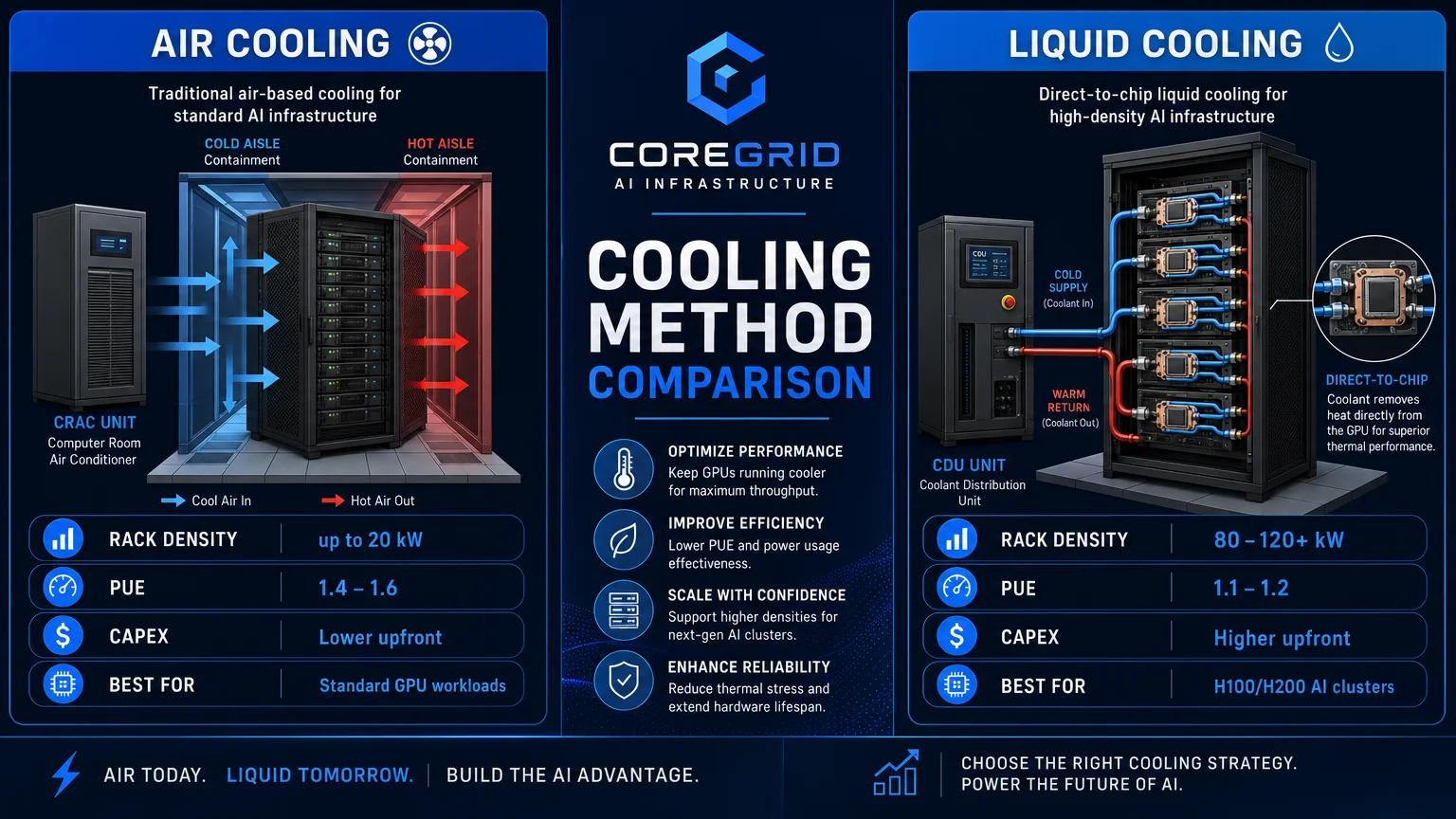
Air cooling has been the data center standard for decades. It’s well understood, widely supported by colocation providers, and requires no specialized server hardware modifications. However, its thermal capacity tops out well below what today’s AI accelerators demand. A rack of eight H100 GPUs can draw 50–80 kW on its own. Air cooling systems simply cannot remove that much heat efficiently without consuming enormous amounts of energy and floor space. Liquid cooling closes that gap by moving heat removal closer to the source, dramatically improving efficiency and enabling the kind of density that large-scale AI training and inference workloads require.
How Do Rack Density Requirements Drive the Liquid Cooling vs Air Cooling Decision?
Rack density is often the single most decisive factor. If your AI workload requires racks above 30 kW—which is typical for any serious GPU cluster running training jobs or large model inference—air cooling becomes increasingly inefficient and, beyond a certain threshold, physically inadequate.
| Cooling Method | Typical Rack Density Support | Common Use Cases |
|---|---|---|
| Air Cooling | 5–20 kW per rack | CPU servers, storage, light inference |
| Enhanced Air Cooling | 20–30 kW per rack | Mid-density GPU inference, hybrid racks |
| Direct-to-Chip Liquid | 40–80+ kW per rack | AI training, H100/H200 GPU clusters |
| Immersion Cooling | 80–120+ kW per rack | Hyperscale AI, maximum density deployments |
For companies deploying even a modest AI training cluster—say, 4–8 H100 nodes—direct-to-chip liquid cooling is almost always the right answer from a density standpoint. For edge inference workloads running on lower-power accelerators, air cooling may remain entirely sufficient. Understanding your actual workload profile before selecting a cooling strategy is critical, which is exactly the kind of analysis that AI server deployment planning should address from the start.
What Are the Real Cost Differences Between Liquid and Air Cooling?
Liquid cooling carries a higher upfront capital cost—there’s no way around that. Coolant distribution units (CDUs), manifolds, liquid-cooled server hardware, and the facility infrastructure to support it all add meaningful cost compared to a standard air-cooled deployment. Depending on the scale and method, liquid cooling infrastructure can add 15–30% to initial hardware and facility buildout costs.
However, the long-term economics often favor liquid cooling for high-density AI workloads. The efficiency gains are substantial. Air-cooled facilities commonly run a PUE (Power Usage Effectiveness) of 1.4–1.6, meaning for every watt of IT load, an additional 0.4–0.6 watts goes to cooling overhead. Liquid-cooled facilities regularly achieve PUE of 1.1–1.2. At the scale of an AI deployment drawing hundreds of kilowatts, that difference compounds into significant annual energy savings.
There’s also the floor space equation. Liquid cooling enables far denser deployments, meaning you may need fewer square feet of colocation space to run the same workload. In markets like Dallas, Northern Virginia, or San Jose—where colocation pricing is driven partly by cabinet count and power draw—denser racks can translate directly into lower monthly recurring costs.
Which Cooling Approach Is Better for AI Training vs. Inference Workloads?
The workload type matters considerably. AI training—running large language models, diffusion models, or other foundation model training jobs—demands sustained, maximum GPU utilization for extended periods. This generates continuous, high-density heat output that pushes air cooling well past its practical limits. For training clusters, liquid cooling is effectively the industry standard among serious operators.
AI inference is more nuanced. Inference workloads are often bursty rather than continuous, and many inference deployments use lower-power accelerators or CPUs. For edge inference nodes, branch office deployments, or applications running on hardware like NVIDIA L4 or L40S GPUs, air cooling may be entirely adequate. Companies running AI server deployment planning in Dallas-Fort Worth for inference-heavy applications often find that a hybrid approach—liquid-cooled training clusters paired with air-cooled inference nodes—gives them the best balance of cost and performance.
How Does Colocation Facility Readiness Affect Your Cooling Choice?
This is where many AI infrastructure plans run into real-world friction. Not every colocation facility supports liquid cooling, and among those that do, the specific methods supported vary considerably. Some facilities offer direct-to-chip liquid cooling infrastructure as a standard option; others support it only in designated high-density zones; and many traditional colocation providers have no liquid cooling capability at all.
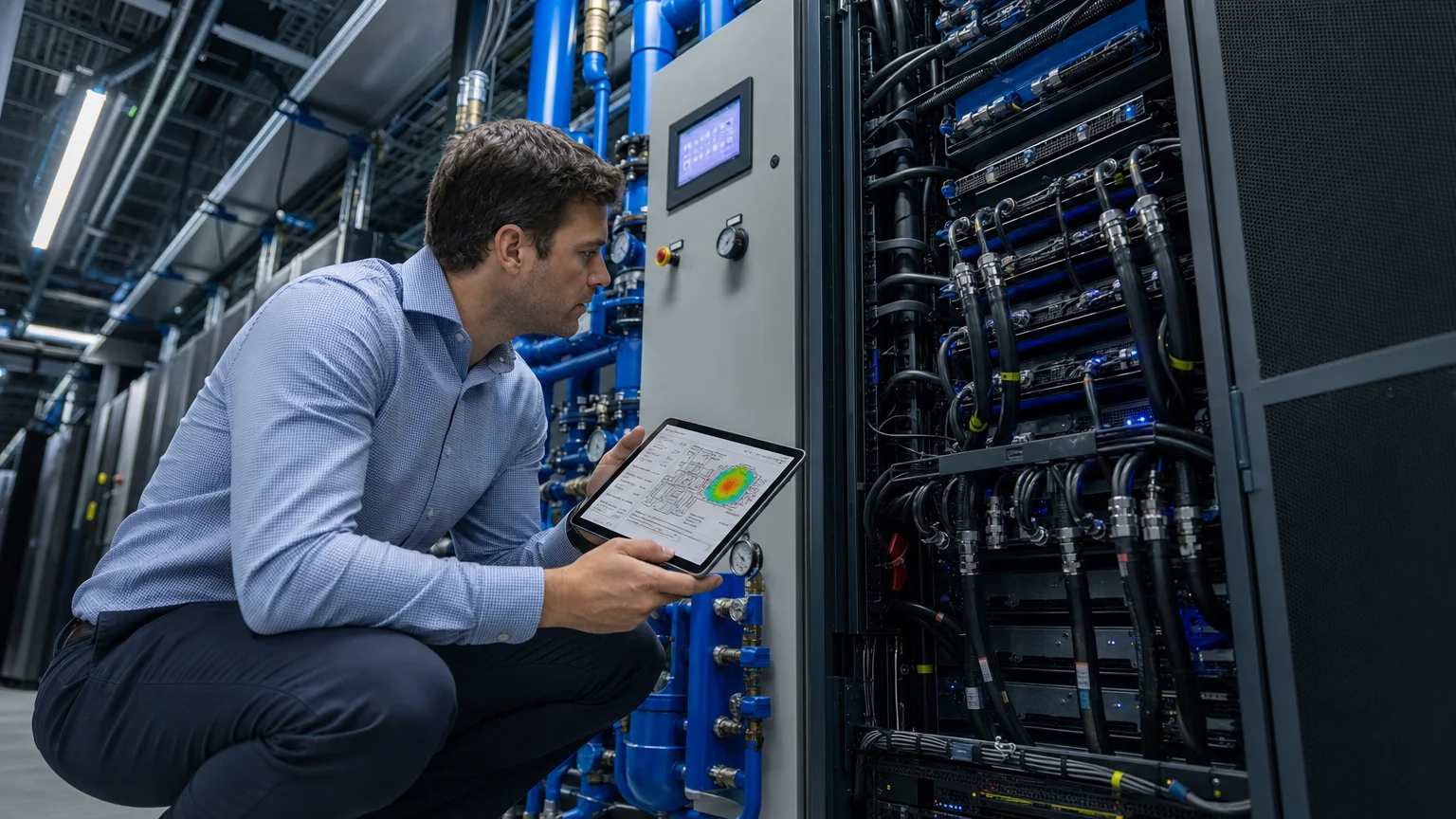
Before selecting a colocation provider for an AI workload, confirming liquid cooling readiness is non-negotiable if your rack densities exceed 30 kW. Key questions to ask include: Does the facility have CDUs available or require you to bring your own? What is the maximum supported rack density? Is there a chilled water loop or does the facility use rear-door heat exchangers? What are the lead times for liquid cooling provisioning? CoreGrid’s liquid-cooling readiness assessments in Atlanta and other markets are designed specifically to answer these questions before a client commits to a lease. The same due diligence applies whether you’re evaluating facilities in Dallas, Phoenix, Chicago, or any other major U.S. data center market.
What Are the Pros and Cons of Each Approach?
Air Cooling
- ✅ Lower upfront cost and simpler installation
- ✅ Universally supported by colocation providers
- ✅ No specialized server hardware required
- ✅ Easier maintenance and familiar operational procedures
- ❌ Practical density ceiling of 20–30 kW per rack
- ❌ Higher PUE and greater energy overhead at scale
- ❌ Insufficient for modern AI training GPU clusters
Liquid Cooling (Direct-to-Chip or Immersion)
- ✅ Supports 40–120+ kW rack densities
- ✅ PUE of 1.1–1.2, significantly lower energy overhead
- ✅ Enables denser, more space-efficient deployments
- ✅ Better suited for sustained high-TDP GPU workloads
- ❌ Higher capital cost for hardware and facility infrastructure
- ❌ Not universally available at colocation facilities
- ❌ More complex maintenance and operational requirements
- ❌ Some immersion systems require specialized server hardware
How Should Dallas-Area Companies Approach This Decision?
Dallas has emerged as one of the fastest-growing AI data center markets in the United States, with significant colocation capacity across the Metroplex. The good news for companies evaluating deployments here is that several major Dallas-area facilities now offer liquid cooling infrastructure or are actively building it out. However, availability is not uniform, and lead times for liquid-cooled capacity can be longer than for standard air-cooled deployments.
For companies beginning an AI infrastructure project in the Dallas-Fort Worth area, the right starting point is a thorough assessment of workload requirements, power needs, and facility options—before signing any colocation agreement. AI data center site selection in Dallas should account for cooling method availability as a primary filter, not an afterthought. The same applies to companies evaluating markets in Austin or Houston, where the landscape of liquid-cooling-ready facilities continues to evolve in 2026.
Making the Right Cooling Decision for Your AI Infrastructure
The liquid cooling vs air cooling question for AI servers doesn’t have a single universal answer—it depends on your GPU hardware, rack density targets, workload patterns, budget, and the colocation options available in your target market. What is clear is that for any serious AI training deployment in 2026, liquid cooling is no longer optional—it’s a prerequisite. For inference and lighter workloads, air cooling remains viable and cost-effective.
CoreGrid AI Infrastructure helps companies across Dallas, Houston, Atlanta, Phoenix, and other major U.S. markets work through exactly these decisions—assessing workload requirements, evaluating facility options, and building infrastructure strategies that align technical needs with real-world colocation availability. If you’re planning an AI server deployment and want a clear-eyed assessment of your cooling options before you sign anything, book an infrastructure strategy call with the CoreGrid team or explore our AI data center site selection services to get started.
Frequently Asked Questions
What is the main reason AI servers need liquid cooling?
Modern AI accelerators like the NVIDIA H100 and H200 generate thermal loads of 700W or more per GPU. A rack of eight to sixteen of these GPUs can draw 50–120 kW continuously, which exceeds the thermal removal capacity of conventional air cooling systems. Liquid cooling removes heat far more efficiently by bringing the cooling medium directly to the heat source.
Can I use air cooling for a small AI deployment?
Yes. If your AI workload runs on lower-power accelerators, uses CPUs for inference, or fits within a rack density of 20–25 kW, air cooling is a practical and cost-effective choice. Air cooling becomes problematic primarily when rack densities climb above 30 kW or when sustained GPU utilization is required around the clock.
What is PUE and why does it matter for cooling decisions?
PUE (Power Usage Effectiveness) measures total facility power consumption divided by IT load power. A PUE of 1.0 would be perfectly efficient. Air-cooled facilities typically run 1.4–1.6; liquid-cooled facilities often achieve 1.1–1.2. For large AI deployments, a lower PUE translates directly into lower monthly energy costs and a smaller carbon footprint.
Does every colocation provider support liquid cooling?
No. Liquid cooling support varies significantly across colocation providers and even across campuses within the same provider's portfolio. Before committing to a facility, it's essential to verify what cooling methods are supported, what the maximum rack density is, and what lead times apply for liquid cooling provisioning.
What is direct-to-chip liquid cooling?
Direct-to-chip cooling routes chilled water or coolant through cold plates that are physically attached to CPUs and GPUs inside the server. It removes heat at the component level rather than relying on airflow. It is less invasive than full immersion cooling and is increasingly supported by major server OEMs as a standard configuration option.
Is immersion cooling the same as liquid cooling?
Immersion cooling is one type of liquid cooling. It involves submerging entire servers in a thermally conductive dielectric fluid. It achieves the highest density and efficiency of any cooling method but requires specialized hardware and facilities. Direct-to-chip cooling is another type of liquid cooling that is more widely supported and easier to deploy in standard colocation environments.
How do I know which cooling method is right for my AI workload?
Start with your workload profile: what hardware are you running, what is the expected TDP per rack, and will utilization be sustained or bursty? Then assess facility options in your target market for cooling method availability. A structured [AI server deployment planning](/ai-server-deployment-planning) engagement can help you map workload requirements to facility capabilities before you commit to any infrastructure decision.
Contributing writer at CoreGrid AI Infrastructure.