

Quick Answer
A GPU colocation agreement should be evaluated across power capacity, cooling infrastructure, SLA terms, exit clauses, scalability, and total cost of ownership before any signature. Asking targeted questions upfront prevents expensive surprises after your hardware is already racked.
Key Takeaways
- GPU workloads often require 40–100+ kW per rack — far beyond what standard colocation contracts assume.
- Cooling infrastructure (air vs. liquid) must be confirmed before hardware arrives, not after.
- SLA terms for power, network, and cooling uptime vary significantly between providers.
- Exit clauses and auto-renewal terms can lock you into agreements that no longer fit your workload.
- Cross-power-path redundancy and generator backup are non-negotiable for production AI workloads.
- Total cost of ownership includes power draw, cross-connects, remote hands fees, and overage charges.
- Vendor-neutral consulting helps identify the right facility before contract negotiations begin.
- Dallas and other major U.S. markets offer meaningfully different capacity, pricing, and power availability.
1. What Is the Facility’s Maximum Power Density Per Rack?
This is the single most important question in any GPU colocation agreement. Standard colocation contracts are often written around 5–15 kW per rack — a figure that is completely inadequate for modern GPU clusters. An NVIDIA H100 server, for example, can draw 700W per GPU, meaning a single 8-GPU node consumes roughly 5.6 kW before accounting for networking, storage, or cooling overhead. A full rack of dense GPU servers can easily exceed 40–80 kW.
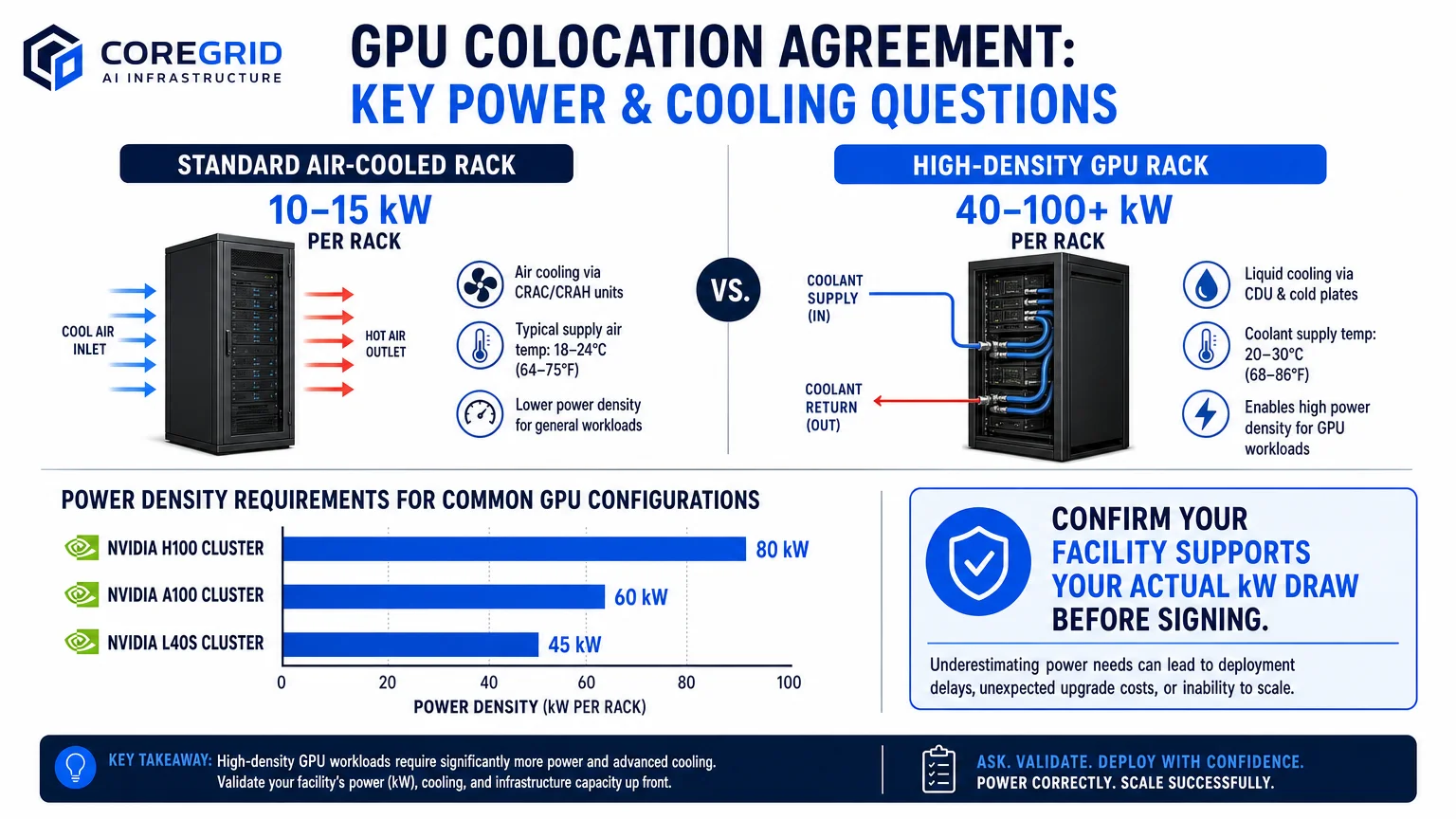
Ask the provider to confirm the maximum sustained kW draw they will support per cabinet, whether that figure is contractually guaranteed, and what happens if your workload exceeds it. Some facilities will throttle power or charge overage rates that are not disclosed in the base contract. If you are planning a high-density AI deployment, review high-density rack planning costs and considerations before entering negotiations so you arrive with accurate numbers.
2. What Cooling Infrastructure Is Available for High-Density GPU Workloads?
Air cooling becomes thermally insufficient at the power densities that GPU workloads demand. Direct liquid cooling (DLC), rear-door heat exchangers, and immersion cooling are increasingly necessary for sustained AI inference and training operations. Ask the provider whether the facility supports any form of liquid cooling, whether it is available in your specific cage or suite, and what the lead time is for deployment.
A facility that advertises liquid cooling availability but only has it in one pod — with an 18-month waitlist — is not meaningfully different from a facility without it. If you are evaluating Dallas-area options, CoreGrid’s liquid-cooling readiness assessments in Dallas-Fort Worth can help you confirm facility readiness before you commit.
3. What Do the SLA Terms Actually Cover — and What Do They Exclude?
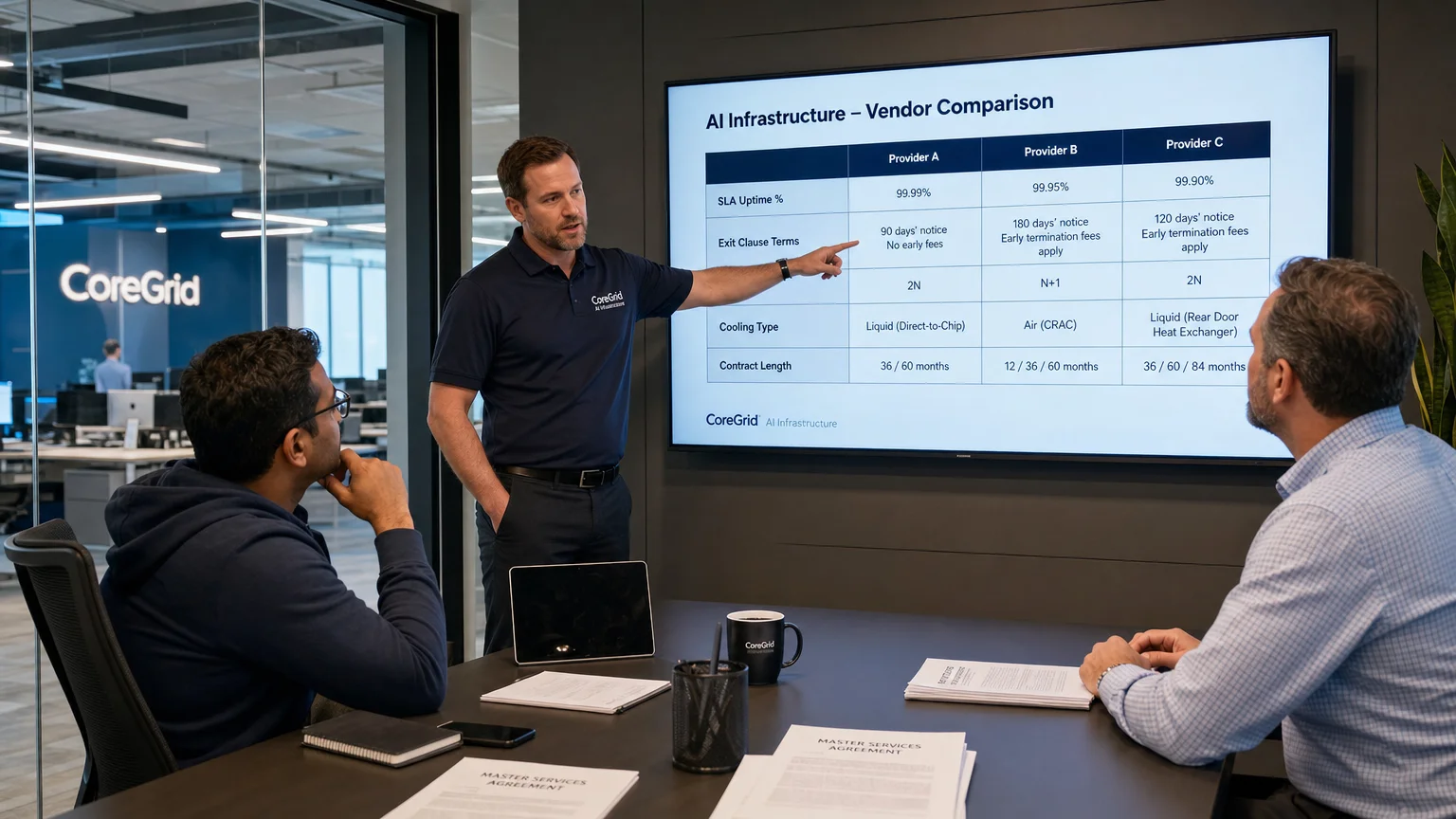
Colocation SLAs are frequently written to protect the provider, not the customer. A “99.999% uptime” guarantee may apply only to the facility’s power infrastructure and explicitly exclude network, cooling, or remote hands services. Read the SLA definition of “downtime” carefully — some providers only count an outage after 15 or 30 consecutive minutes, which means brief but repeated disruptions may never trigger a credit.
Ask specifically: What is the credit structure for SLA violations? Is the credit capped at one month of fees? Does the SLA cover cooling failures, or only power? Are there carve-outs for scheduled maintenance windows? The answers will tell you more about a provider’s actual reliability posture than any marketing claim.
4. What Are the Exit Clause and Auto-Renewal Terms?
Many GPU colocation agreements include auto-renewal clauses that activate 90–180 days before contract expiration — meaning if you miss the notification window, you are locked in for another full term. Ask for the exact notice period required to terminate or renegotiate, whether there are early termination fees, and how those fees are calculated (flat fee vs. remaining contract value).
For AI workloads specifically, your capacity needs may change significantly within a 12–24 month window as models scale or workloads shift. A contract with no flexibility to reduce footprint without penalty can become a significant financial liability.
5. How Is Power Redundancy Structured at This Facility?
Redundancy architecture matters more than the raw uptime number. Ask whether the facility is designed to a 2N, N+1, or A+B power configuration. Confirm that your specific cage or suite is fed from two independent power paths, and ask whether generator backup covers 100% of critical load or only a portion of the facility.
For production AI workloads, a single-path power feed is an unacceptable risk. Also ask about the facility’s fuel supply agreements — a generator that runs out of diesel during an extended grid outage is not a meaningful backup.
6. What Network Connectivity and Cross-Connect Options Are Available?
GPU workloads often require high-throughput, low-latency connectivity for data ingestion, model serving, and inter-cluster communication. Ask which carriers and cloud on-ramps are available in the facility, what the cost structure is for cross-connects, and whether there are minimum commit requirements on bandwidth.
Cross-connect fees are a commonly overlooked cost that can add thousands of dollars per month to a colocation bill. Confirm whether the provider charges per cross-connect, per port, or on a flat-rate basis, and whether those fees are included in your base contract or billed separately.
7. What Is the True Total Cost of Ownership Beyond the Base Rate?
The base colocation rate is rarely the number that appears on your invoice. Ask the provider to walk through every billable line item: power draw charges above a baseline kW allocation, remote hands labor rates, shipping and receiving fees, cross-connects, bandwidth overages, and any facility access fees.
For GPU deployments, power draw charges are often the largest variable cost. If the contract bills power at a per-kWh rate above a base allocation, model your actual expected draw against that rate before signing. A seemingly competitive base rate can become expensive once GPU workloads run at full utilization.
8. How Does the Provider Handle Capacity Expansion?
AI infrastructure requirements rarely stay static. Ask the provider what the process is for adding additional cabinets, increasing power allocation, or expanding into an adjacent cage or suite. Confirm whether expansion capacity is contractually reserved or simply offered on a best-effort basis.
Some facilities are operating at or near capacity in specific power zones, meaning that expansion may require moving to a different part of the building — or a different facility entirely. If multi-city scaling is part of your roadmap, CoreGrid’s work on AI data center site selection and multi-market deployment strategy can help you evaluate which markets offer the most headroom.
9. What Are the Physical Security and Compliance Provisions?
For AI workloads handling sensitive data, ask about the facility’s physical security controls: biometric access, mantrap entry, 24/7 CCTV, and visitor escort policies. If your workload is subject to compliance frameworks (SOC 2, HIPAA, FedRAMP, or others), ask the provider for documentation of their own certifications and confirm which controls are the customer’s responsibility versus the facility’s.
Do not assume a facility’s certifications automatically satisfy your compliance obligations — they typically cover only the physical and environmental controls, not the logical security of your systems.
10. What Is the Provider’s Track Record With High-Density GPU Deployments?
This question is often skipped, but it is among the most revealing. Ask the provider how many GPU-dense deployments they currently support, what the highest sustained kW-per-rack deployment in the facility is, and whether they have experience with the specific GPU hardware you are deploying. A facility that has never supported a 60+ kW rack may not have the operational processes to handle the thermal and power management challenges that come with it.
Request references from existing GPU colocation customers if possible, and ask specifically about their experience during initial deployment and any incidents that occurred. If you want an independent assessment before committing, CoreGrid’s AI server deployment planning service can provide a structured evaluation of whether a facility is genuinely ready for your workload.
GPU Colocation Agreement: Key Terms Comparison
| Contract Term | What to Watch For | Red Flag |
|---|---|---|
| Power density cap | Confirm kW per rack in writing | No contractual kW guarantee |
| SLA coverage scope | Power, cooling, AND network | SLA covers power only |
| Auto-renewal notice | 30–60 days is reasonable | 90–180 day notice required |
| Exit/termination fee | Flat fee or declining schedule | Full remaining contract value |
| Expansion rights | Reserved capacity in writing | Best-effort only |
| Remote hands rates | Hourly rate disclosed upfront | Rates not disclosed in contract |
| Cross-connect fees | Per-port pricing itemized | Bundled and opaque |
Frequently Asked Questions
What makes a GPU colocation agreement different from a standard colocation contract?
GPU colocation agreements must address power density, cooling infrastructure, and thermal management requirements that standard contracts were not designed to handle. A typical enterprise colocation contract assumes 5–15 kW per rack; GPU deployments often require 40–100+ kW per rack, which changes nearly every term in the agreement.
How long should a GPU colocation contract term be?
Initial terms of 12–24 months are reasonable for GPU deployments, giving enough stability to justify the deployment cost while preserving flexibility as workloads evolve. Longer terms (36–60 months) may offer better pricing but carry more risk if your capacity needs change.
Can I negotiate a GPU colocation agreement, or are terms fixed?
Most colocation providers will negotiate on power allocation, pricing tiers, expansion rights, and SLA credit structures — especially for larger deployments. Arriving at negotiations with a clear technical specification and competitive alternatives significantly improves your position.
What is the most commonly overlooked cost in a GPU colocation agreement?
Per-kWh power overage charges are the most frequently underestimated cost. GPU clusters running at full utilization can draw significantly more power than the base contract allocation, triggering overage rates that were not factored into the original budget.
How do I evaluate whether a facility can actually support my GPU workload?
Request a technical review of the facility’s power distribution architecture, cooling capacity per zone, and existing high-density deployments. A vendor-neutral consultant can help you assess whether the facility’s stated capabilities match your actual requirements before you sign.
What should I do if a provider refuses to answer these questions before signing?
Treat it as a disqualifying signal. Reputable colocation providers will provide detailed technical documentation, reference customers, and contract redlines as part of a normal sales process. Reluctance to answer specific questions about power, cooling, or SLA scope typically indicates limitations the provider does not want disclosed.
Does colocation location matter for GPU workloads?
Yes — power availability, cooling climate, network carrier density, and market capacity all vary by location. Markets like Dallas, Northern Virginia, and Phoenix offer different trade-offs in terms of power cost, latency to major cloud regions, and available facility inventory. CoreGrid’s AI data center site selection in Dallas provides market-specific analysis for teams evaluating Texas deployments.
Make a More Informed Decision Before You Sign
A GPU colocation agreement is a multi-year infrastructure commitment that directly affects your AI workload’s performance, cost, and scalability. The 10 questions covered here are the foundation of any serious due diligence process — but evaluating the answers requires technical context that not every team has in-house.
CoreGrid AI Infrastructure has supported more than 120 colocation and data center projects across 18 U.S. markets, helping AI startups, enterprise IT teams, and SaaS companies make informed decisions before committing to long-term agreements. If you are evaluating GPU colocation options in Dallas, the broader Texas market, or any major U.S. data center hub, book an infrastructure strategy call to get vendor-neutral guidance tailored to your specific workload and timeline.
Frequently Asked Questions
What makes a GPU colocation agreement different from a standard colocation contract?
GPU colocation agreements must address power density, cooling infrastructure, and thermal management requirements that standard contracts were not designed to handle. A typical enterprise colocation contract assumes 5–15 kW per rack; GPU deployments often require 40–100+ kW per rack, which changes nearly every term in the agreement.
How long should a GPU colocation contract term be?
Initial terms of 12–24 months are reasonable for GPU deployments, giving enough stability to justify the deployment cost while preserving flexibility as workloads evolve. Longer terms (36–60 months) may offer better pricing but carry more risk if your capacity needs change.
Can I negotiate a GPU colocation agreement, or are terms fixed?
Most colocation providers will negotiate on power allocation, pricing tiers, expansion rights, and SLA credit structures — especially for larger deployments. Arriving at negotiations with a clear technical specification and competitive alternatives significantly improves your position.
What is the most commonly overlooked cost in a GPU colocation agreement?
Per-kWh power overage charges are the most frequently underestimated cost. GPU clusters running at full utilization can draw significantly more power than the base contract allocation, triggering overage rates that were not factored into the original budget.
How do I evaluate whether a facility can actually support my GPU workload?
Request a technical review of the facility's power distribution architecture, cooling capacity per zone, and existing high-density deployments. A vendor-neutral consultant can help you assess whether the facility's stated capabilities match your actual requirements before you sign.
What should I do if a provider refuses to answer these questions before signing?
Treat it as a disqualifying signal. Reputable colocation providers will provide detailed technical documentation, reference customers, and contract redlines as part of a normal sales process. Reluctance to answer specific questions about power, cooling, or SLA scope typically indicates limitations the provider does not want disclosed.
Does colocation location matter for GPU workloads?
Yes — power availability, cooling climate, network carrier density, and market capacity all vary by location. Markets like Dallas, Northern Virginia, and Phoenix offer different trade-offs in terms of power cost, latency to major cloud regions, and available facility inventory. CoreGrid's [AI data center site selection in Dallas](/ai-data-center-site-selection-in-dallas) provides market-specific analysis for teams evaluating Texas deployments.
Contributing writer at CoreGrid AI Infrastructure.