In this article
- Key Takeaways
- What Makes Colocation Evaluation Different for AI Workloads?
- How Do You Assess Power Density and Electrical Infrastructure?
- What Cooling Infrastructure Should You Require for GPU Servers?
- How Should You Compare Colocation Providers on Network Connectivity?
- What SLA Terms Actually Matter for AI Server Deployments?
- How Do You Evaluate Scalability and Contract Flexibility?
- What Physical Security and Compliance Requirements Apply?
- Make a More Informed Colocation Decision
Fewer than 15% of traditional colocation facilities in the U.S. can currently support the power density requirements of modern GPU clusters — a gap that catches many AI teams off guard after they’ve already signed a contract. Knowing how to evaluate a colocation provider for AI server deployments before committing is one of the most consequential decisions a compute team will make in 2026.
This guide walks through the specific criteria that distinguish a capable AI colocation partner from a facility that was built for a different era of computing.
Key Takeaways
- AI server deployments require power densities of 20–80+ kW per rack — far beyond the 5–10 kW typical of legacy colocation facilities.
- Cooling infrastructure (liquid vs. air) is a hard technical constraint, not a preference — verify it before signing.
- Network carrier diversity and low-latency interconnects matter significantly for inference workloads.
- SLA terms for AI deployments should address power, cooling, and connectivity separately — not just uptime.
- Scalability path and expansion rights in your contract protect future growth without forced re-migration.
- Physical security, compliance posture, and remote hands capabilities vary widely between providers.
- Working with a vendor-neutral advisor helps avoid being steered toward a facility that doesn’t fit your technical requirements.
What Makes Colocation Evaluation Different for AI Workloads?
Standard colocation evaluation criteria — uptime, physical security, pricing per U — were designed for web servers and storage arrays. AI server deployments, particularly those running NVIDIA H100s, AMD MI300Xs, or similar GPU hardware, operate under fundamentally different constraints.
The core difference is thermal and electrical density. A single 8-GPU server can draw 10–15 kW on its own. A full rack of GPU nodes can exceed 40–80 kW, compared to the 5–10 kW that most legacy colo facilities were engineered to support. When evaluating a colocation provider for AI server deployments, power density per cabinet is the first filter — not the last.
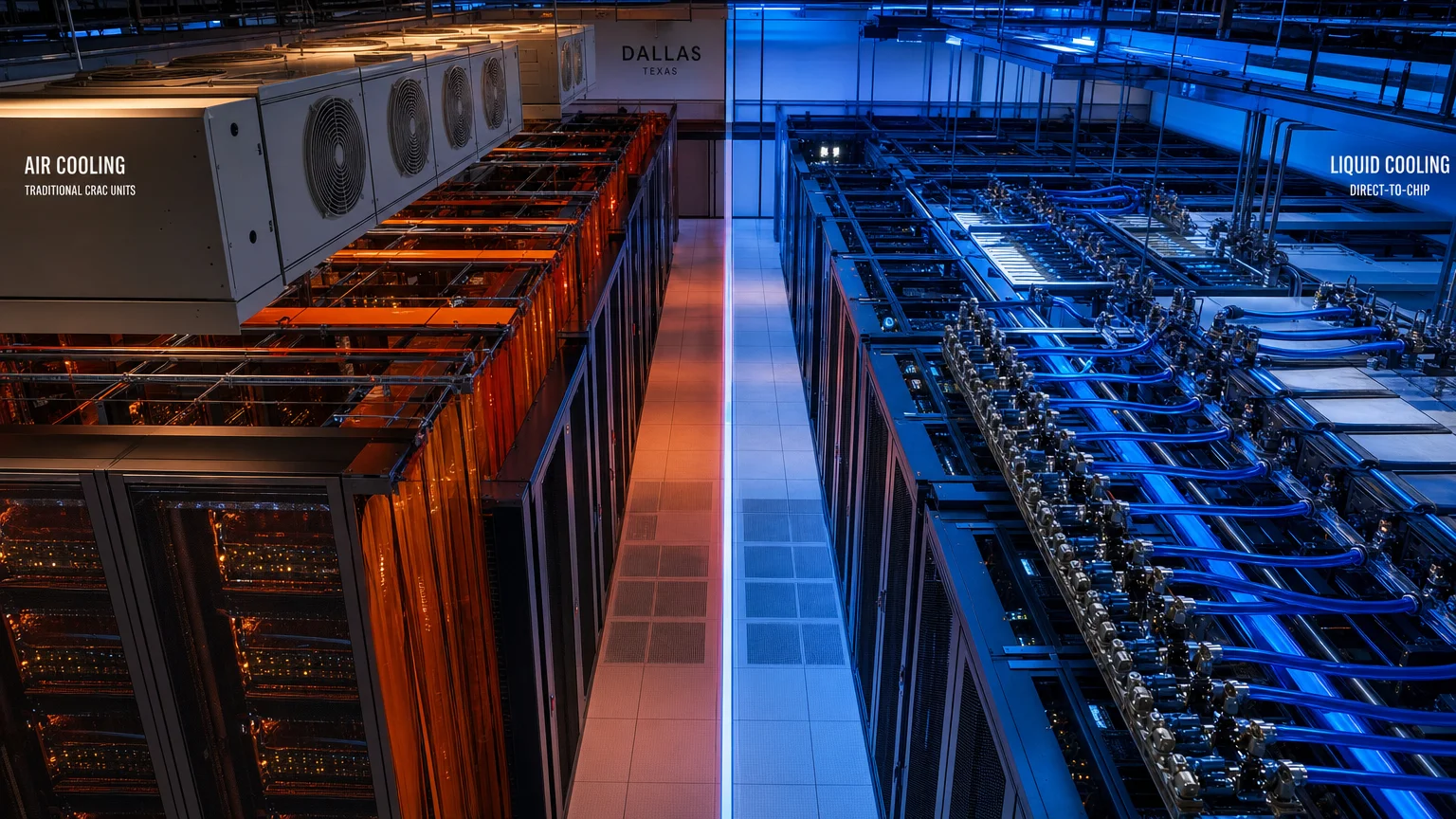
Beyond raw power, GPU workloads generate heat at rates that overwhelm traditional air-cooling architectures. Facilities that haven’t invested in rear-door heat exchangers, in-row cooling, or direct liquid cooling (DLC) loops will either throttle your hardware or force derating that reduces performance. These aren’t edge cases — they’re the primary reason AI teams experience unexpected performance degradation after deployment.
How Do You Assess Power Density and Electrical Infrastructure?
Power availability is the single most constrained resource in U.S. data center markets right now, and it deserves a dedicated line of inquiry with any prospective colocation provider.

When evaluating a facility, ask for the committed kW per cabinet — not the theoretical maximum. Providers will often quote a building’s total capacity, which is meaningless if your specific cage or suite allocation is on a shared power circuit with limited headroom. Key questions to ask include:
- What is the committed power density per rack (in kW)? Get this in writing.
- Is power metered separately, and how is oversubscription managed?
- What is the facility’s available utility capacity, and is there a substation upgrade in progress?
- Are redundant power feeds (A+B) standard, or an add-on?
- What is the generator backup capacity and transfer time?
For teams planning GPU clusters in Texas markets, CoreGrid’s GPU colocation sourcing in Dallas service helps clients verify actual available power allocations — not just what’s listed in a sales deck.
What Cooling Infrastructure Should You Require for GPU Servers?
Cooling is where many AI deployments encounter their first serious operational problem, and it’s the criterion most often glossed over during a standard facility tour.

Air cooling at scale becomes physically inadequate above roughly 20–25 kW per rack. At higher densities, you need one of the following: rear-door heat exchangers (RDHx), in-row cooling units positioned adjacent to high-density racks, or direct liquid cooling (DLC) loops that carry heat away from the chip level. Not every facility offers all three, and some offer none.
When evaluating a colocation provider for AI server deployments, ask specifically:
- Does the facility support rear-door heat exchangers, and are they customer-supplied or facility-provided?
- Is chilled water infrastructure available at the rack level, or only at the room level?
- What is the facility’s Power Usage Effectiveness (PUE) rating, and how is it measured?
- Has the facility previously hosted GPU clusters at comparable density? Can they provide references?
CoreGrid’s liquid-cooling readiness assessments in Dallas-Fort Worth are specifically designed to answer these questions before a client commits to a facility — not after hardware is already racked.
How Should You Compare Colocation Providers on Network Connectivity?
For inference workloads and real-time AI applications, network latency and carrier diversity are operational requirements, not optional upgrades. A facility’s network posture should be evaluated with the same rigor as its power and cooling specs.
| Connectivity Factor | What to Look For |
|---|---|
| Carrier diversity | Minimum 2–3 Tier 1 carriers on-net |
| Cross-connect options | Direct fiber to major cloud on-ramps (AWS, Azure, GCP) |
| Latency to end users | Proximity to major metro population centers |
| BGP routing | Provider-managed or customer-controlled? |
| Dark fiber availability | For private interconnects between sites |
Dallas, as a major internet exchange hub, offers strong carrier diversity — one reason it has become a preferred market for AI inference infrastructure. For a detailed market comparison, the Dallas vs Phoenix for AI Data Center Deployment 2026 guide covers connectivity benchmarks side by side.
What SLA Terms Actually Matter for AI Server Deployments?
Most colocation SLAs were written for traditional IT workloads and default to a single uptime percentage — typically 99.9% or 99.99%. For AI deployments, that number alone is insufficient.
A meaningful SLA for GPU colocation should address:
- Power SLA: Guaranteed power delivery at the committed kW level, with remedies for brownouts or capacity reductions.
- Cooling SLA: Temperature and humidity thresholds within the cage or suite, with defined response times for excursions.
- Network SLA: Packet loss, latency, and availability commitments per carrier, not just “best effort.”
- Remote hands SLA: Response time for on-site technical assistance — critical when your team isn’t local.
- Escalation procedures: Who do you call at 2 a.m. when a PDU trips?
Read the force majeure clauses carefully. Some providers exclude power grid events from SLA remedies entirely — which is a meaningful risk in markets with grid constraints.
How Do You Evaluate Scalability and Contract Flexibility?
AI infrastructure requirements change faster than most other IT workloads. A colocation agreement that locks you into a fixed footprint for three to five years without expansion rights can become a serious operational constraint within 18 months.
When reviewing contract terms, look for:
- Right of first refusal on adjacent cage or suite space.
- Defined expansion pricing ideally locked to an index rather than market rate at time of expansion.
- Power upgrade path can you increase your committed kW allocation without re-negotiating the entire agreement?
- Early termination provisions what are the penalties, and are they proportional?
Teams planning multi-site deployments should also consider how a provider’s footprint maps to their geographic strategy. CoreGrid’s AI data center site selection in Dallas and AI data center site selection in Austin services help clients think through multi-city footprints before signing any single-market agreement.
For teams in Texas evaluating Houston as part of a regional strategy, AI server deployment planning in Houston covers market-specific capacity considerations.
What Physical Security and Compliance Requirements Apply?
Physical security requirements vary significantly by workload type. Financial services, healthcare, and government-adjacent AI applications often carry compliance obligations — SOC 2 Type II, HIPAA, FedRAMP — that not every colocation facility is equipped to support.
At minimum, evaluate:
- Access control: Biometric + badge + man-trap entry is standard for serious facilities.
- CCTV coverage: 24/7 recording with defined retention periods.
- Audit logging: Who accessed your cage, and when.
- Compliance certifications: SOC 2 Type II is the baseline; ask which auditor conducted it and when it was last renewed.
- Staff vetting: Background check policies for facility technicians with access to your equipment.
If your AI workload handles sensitive data, compliance posture should be a hard filter — not a negotiation point.
Make a More Informed Colocation Decision
Evaluating a colocation provider for AI server deployments requires a different framework than traditional IT procurement. Power density, cooling architecture, SLA specificity, and contract flexibility are the variables that determine whether a facility can actually support your workload — not just host it.
CoreGrid AI Infrastructure helps AI teams, SaaS companies, and enterprise IT departments across Dallas, Houston, Austin, Phoenix, and 14 other U.S. markets assess colocation options against their specific technical requirements. With 120+ data center and colocation projects reviewed and $420M+ in infrastructure decisions supported, the team brings vendor-neutral perspective to one of the most consequential infrastructure choices a compute team makes.
To discuss your deployment requirements, contact CoreGrid AI Infrastructure or review the FAQ for common questions about the advisory process.